By Z. Aw | Published
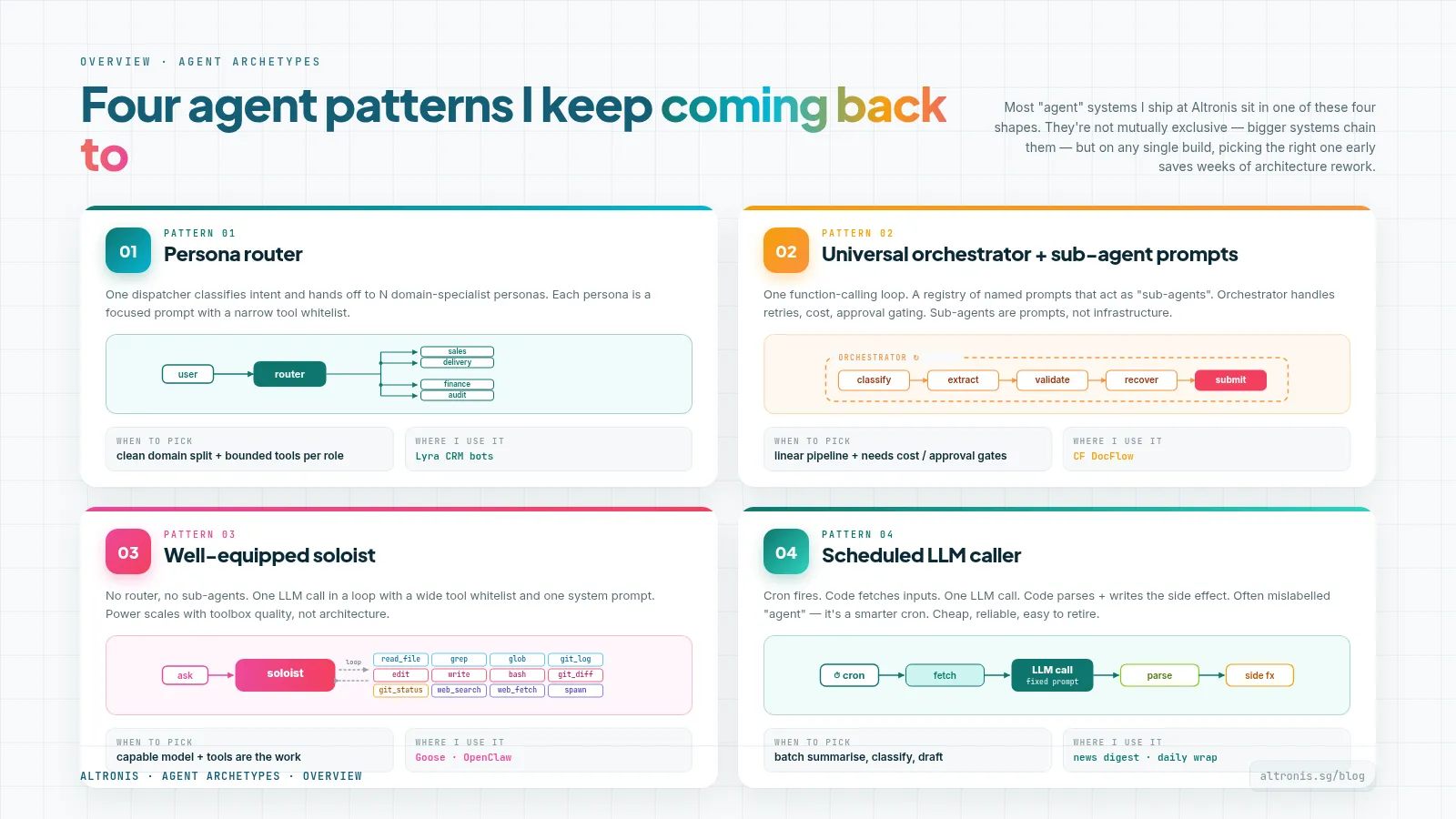
Four agent patterns I keep coming back to
Last weekend I sat down to audit every AI agent I've shipped over the past twelve months. The count surprised me: roughly 280 LLM-touching components across seven systems - a personal CRM, a customer-facing document pipeline, an internal sales-ops portal, several cron-driven automations, a couple of open-source agent runners, and a few standalone bots.
Nobody asked me to commit to a single "agent framework". I just picked the right shape for each problem as it came up.
Going back over the inventory, four patterns kept showing up. Not because they're trendy or because some book told me to - because each one fits a specific kind of problem better than the others.
This post is for anyone building more than one agent. If you find yourself reaching for "what's the right shape for this?", these are the four shapes I keep returning to, and the trade-offs I've felt.
Pattern 1 - The persona router
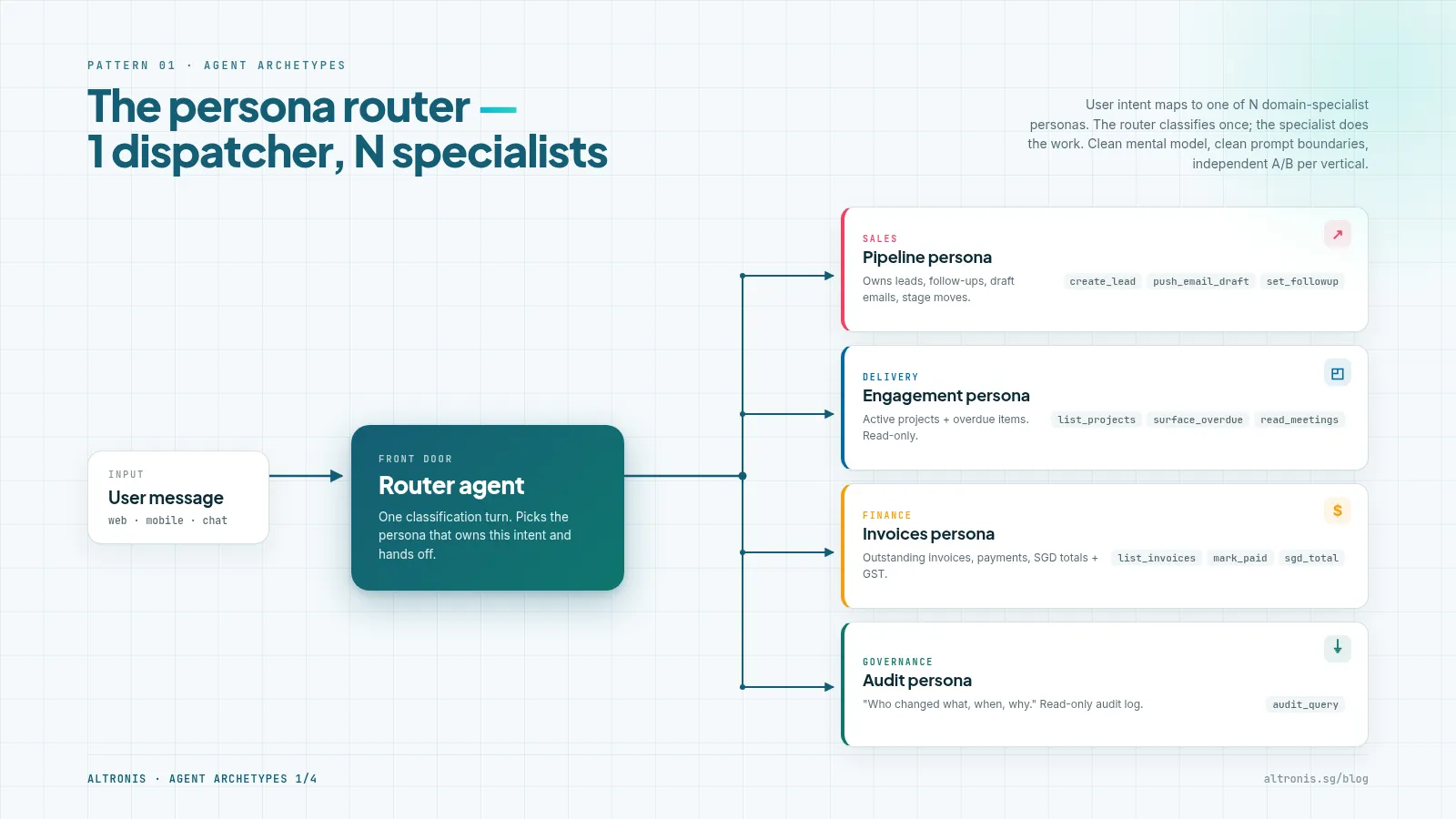
Shape. One agent acts as a front-door router. It listens to user intent and dispatches to one of N domain-specialist personas. Each persona has its own prompt, its own tool set, and its own scope.
What I've used it for. The chat assistant inside a CRM where intents cluster into 4–5 clean verticals (sales, delivery, finance, governance). The user just types one message; the router figures out which specialist owns the answer.
Why it works.
- Clean mental model for the user. They don't have to know which mode they're in.
- Each persona stays focused. Its prompt isn't trying to do everything.
- You can independently A/B-test each vertical without touching the others.
Trade-offs.
- The routing decision is its own latency tax. Every user turn costs you a small classification call before the actual answer starts.
- If the verticals overlap ("what's the cashflow for the project I'm running?" - finance or delivery?), the router becomes a contested area you'll keep tuning.
- You inherit five prompts to maintain instead of one big one.
When to pick this. A user-facing assistant where the intents cleanly partition. If your verticals are blurry, this isn't your pattern - pattern 3 below will serve you better.
Pattern 2 - Universal orchestrator + sub-agent prompt packs
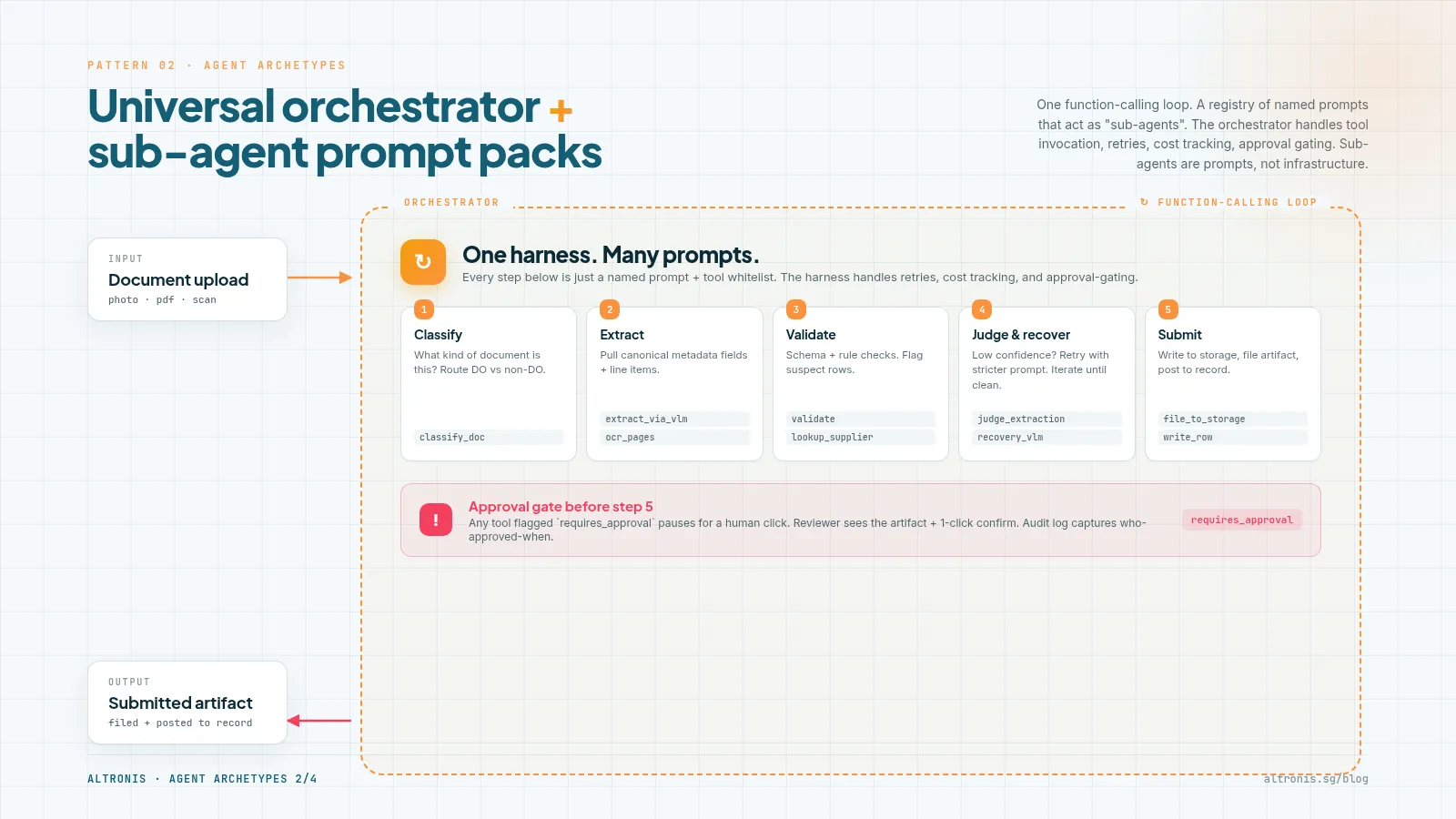
Shape. One generic function-calling loop. A registry of named prompts, each one acting as a "sub-agent" the orchestrator can dispatch into. The orchestrator handles tool invocation, retries, cost tracking, and approval gating. Sub-agents are just prompt files with a name and a tool whitelist.
What I've used it for. Structured workflows with predictable sub-steps. A document-OCR pipeline (classify → extract → judge → recover); a sales-registration intake (10 sub-stages from upload to BC posting). Each sub-stage has a focused prompt; the orchestrator stitches them.
Why it works.
- Reuse: one orchestrator handles all the production concerns (auth, retries, audit, cost). You add a sub-agent by writing a prompt, not by writing infrastructure.
- Composability: sub-agents become Lego pieces. Today's extract prompt could be the third step in tomorrow's compliance review.
- Approval-gated cleanly: the orchestrator checks
requires_approvalon every tool call; sub-agent prompts don't have to think about it.
Trade-offs.
- The orchestrator becomes the bottleneck of your design. Anything it doesn't natively support (long-running tasks, parallel sub-agents) requires hacks.
- Sub-agents are constrained to whatever shape the orchestrator allows. Want one to call an external HTTP service? Hope the orchestrator's tool registry exposes that pattern.
- You can fool yourself into thinking you "have 30 agents" when you really have 30 prompts and one agent.
When to pick this. A structured workflow with predictable sub-steps, approval gates, and a need for consistent observability. This is the production-shape for B2B automation in my experience.
Pattern 3 - The well-equipped soloist
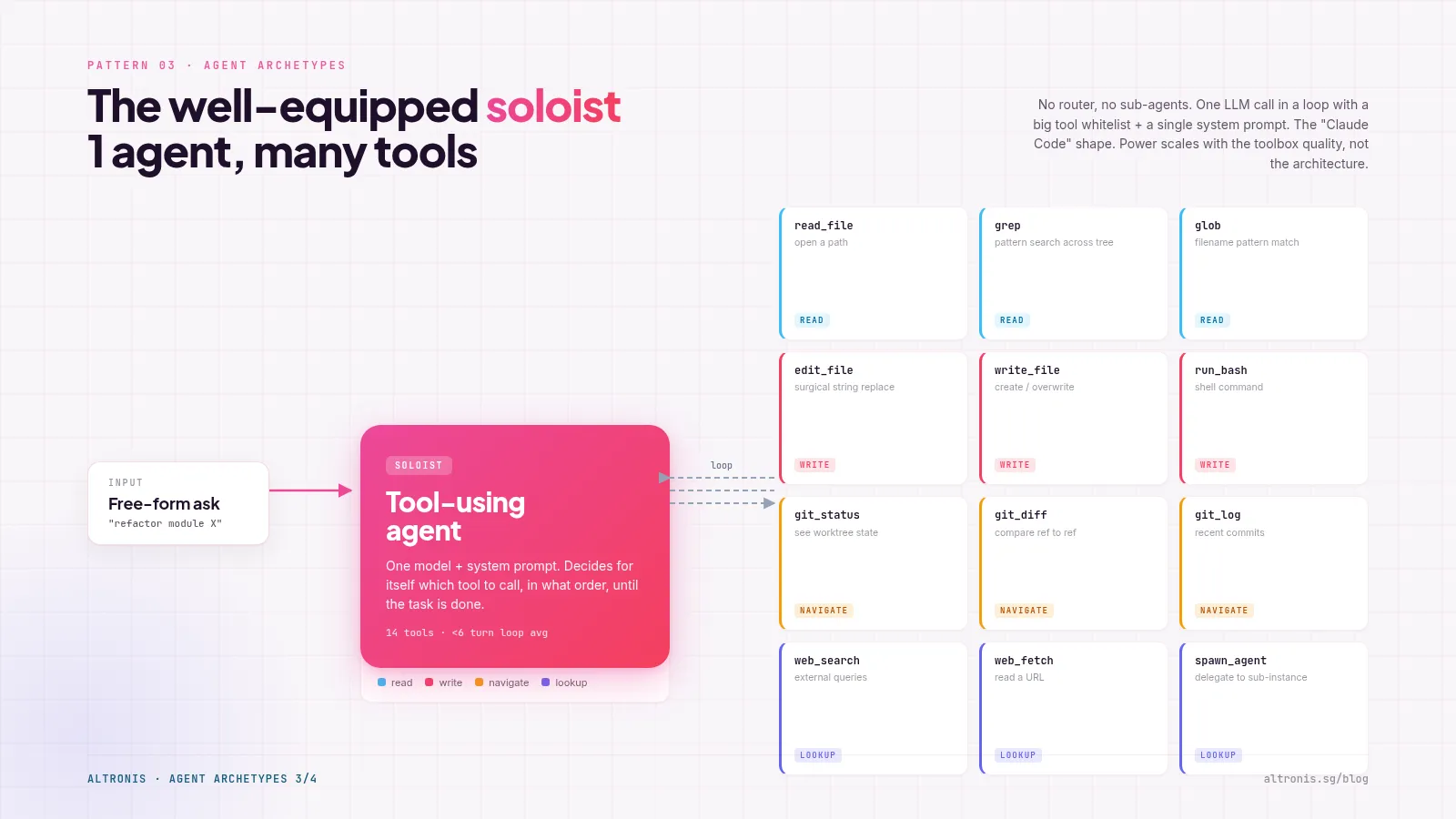
Shape. One persona, one prompt, one large tool catalogue. No sub-routing. The agent reasons about which tool to call next, calls it, observes the result, decides the next move.
What I've used it for. An embedded chat assistant inside a single app (24 custom tools, all scoped to "operate on documents in this app"). Also the open-source runners I keep around - Goose, and Claude Code itself, are this shape.
Why it works.
- The richest agent UX possible. No "wrong persona" failure mode - the agent always has every tool available.
- Easiest to add capabilities to. New feature? Add a tool. Done. No routing decision to update.
- Aligns with how the underlying models are trained - modern LLMs are good at tool selection from a flat list of 20-40 tools.
Trade-offs.
- Context bloats. Every tool's schema lives in the agent's system prompt. Past about 50 tools, performance drops.
- Hard to constrain. The agent can call any tool any time; preventing it from doing something dumb requires guardrails inside each tool, not at the agent level.
- Bounded-domain only. The moment you'd want it to do "X kind of work AND Y kind of work where X and Y have different audit requirements", you've outgrown this pattern.
When to pick this. A bounded domain (one app, one user role) with rich actions. If you have a clear authorisation boundary and ≤ ~40 tools, this is the highest-quality agent UX you can ship.
Pattern 4 - The scheduled LLM caller
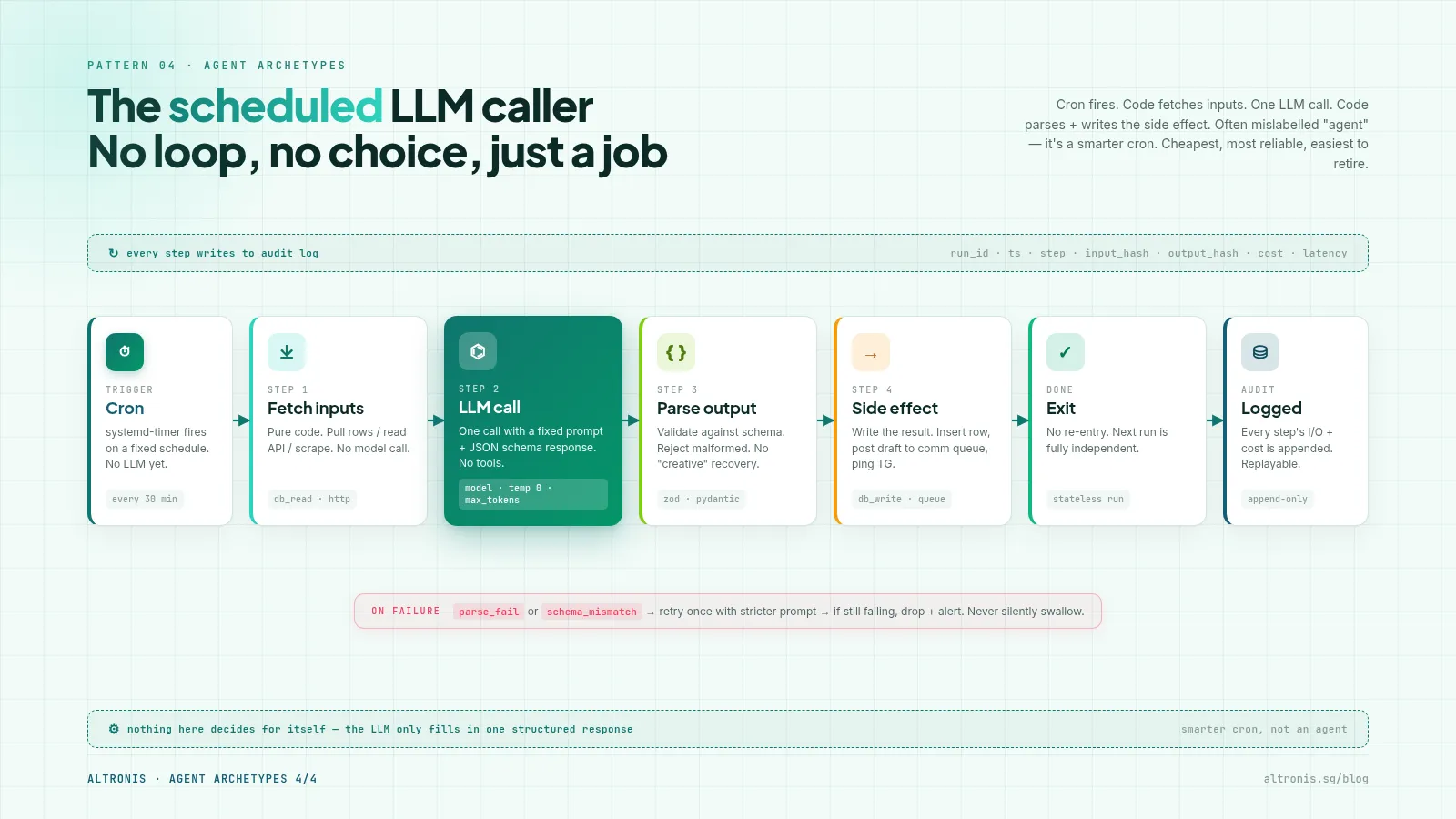
Shape. Cron triggers a script. The script calls an LLM with a fixed prompt and a structured-output schema. The script processes the response (writes to a DB, sends a message, opens a PR). No conversation; no persistent state inside the agent.
What I've used it for. Daily news digests, lead-discovery passes, code-review summaries, "look at yesterday's data + tell me what changed" reports. Most of OpenClaw's ~90 cron jobs are this shape.
Why it works.
- Predictable cost. You know exactly how many LLM calls per day and what each costs.
- Easy to debug. The input is the cron firing plus a fixed prompt; the output is a structured object. If something goes wrong, you can re-run the same prompt and see if the output is the same.
- No conversational state to manage. No session expiry, no token-counting, no streaming.
Trade-offs.
- Zero conversational ability. If the prompt doesn't anticipate what's in the data, you get garbage. You have to iterate the prompt offline.
- Brittle to upstream changes. If the data source's schema shifts, your structured-output expectation breaks silently.
- The "agent" framing is a stretch. It's really just a function with an LLM inside. But it's how a lot of useful automation actually ships.
When to pick this. Time-driven, deterministic input/output shape, non-interactive. The unglamorous workhorse pattern.
The decision table
Trigger shape + output shape almost always pick the pattern for you.
| Trigger | Output shape | Pattern to pick |
|---|---|---|
| User types a message; intent partitions cleanly into N verticals | Conversational answer | (1) Persona router |
| Workflow with predictable sub-steps + approval gates | Structured artifact (document, posting, etc.) | (2) Universal orchestrator + sub-agent prompts |
| User operates inside one bounded app with rich actions | Conversational actions on the app's data | (3) Well-equipped soloist |
| Time-driven (cron) with deterministic input/output schema | Structured digest / report / draft | (4) Scheduled LLM caller |
A useful rule: if you can't say which pattern fits in 30 seconds, you're probably trying to make one pattern do the job of two. Split the problem first, then pick a pattern per sub-problem.
What's actually shared across all four
Every one of these patterns ends up needing the same four supporting pieces:
- A provider chain. Primary model → first fallback → second fallback. Most production usage I've seen ends up routing through 2–3 providers (one paid, one free-tier, one self-hosted) and falling through on rate limits or 5xx. Get this right once, reuse across patterns.
- An audit log per LLM call. What prompt, what model, what tokens in/out, what cost, who triggered it, what tool calls it made. Without this you can't answer "why did the agent do that" three weeks later. I've never regretted writing this; I've often regretted not writing it.
- An approval queue for write actions. Anything the agent does that touches external systems (sends email, files documents, posts to social) should land in a queue first and require a human click. Even if the human always clicks Approve - the friction prevents 90% of the "oops" moments.
- A tool contract. MCP is becoming the default for new work. For existing agents, any JSON-schema-shaped contract works. The point is that "what can this agent do" is a list you can read, not a sprawl of inline function calls.
These four are the things worth standardising across your stack. The orchestration shape (patterns 1-4) should stay tuned per problem.
What I'd tell past-me
Two things.
One: don't unify the patterns too early. It's tempting to factor them into a single "AgentFramework" library. I tried this once at component count ≈ 30 and ended up with a lowest-common-denominator framework that fit nothing perfectly. Each pattern's value comes from being tuned to its problem. The patterns are stable; the implementations diverge for good reasons.
Two: do unify the four shared pieces (provider chain, audit log, approval queue, tool contract) into one shared library. That's where the real reuse lives. New agent in a new pattern? Pull in your-org/agent-core for those four concerns, then build the orchestration shape that fits.
At my current ~280 components, I'm at the size where the patterns are obvious but the shared library hasn't been extracted yet. That's the next refactor. It's also probably the next refactor for anyone else who finds themselves writing their fifth or sixth agent.
If you've been wondering whether to commit to one framework: don't. Commit to four patterns, share four building blocks, ship.
Related reads
Last updated 23 May 2026.